

It’s been almost three months since I’ve had the MSI Claw 8 AI+, and for the past month, I got to finally put the device to the test to see how the beefy handheld fared when using it to play triple-A games while on the go—the sole reason I spent an arm and a leg to buy the damned thing in the first place.
I took MSI’s 8-inch Intel beast 5,000 miles towards the south to Brazil, where I spent the past month spending time with the in-laws, taking in that beautiful Paraty breeze and stuffing my face with countless pão de queijos in between having anxiety attacks as I made my way through The Altars trying to keep the many versions of Jan Dolski alive each day—Oh, great, technician Jan and scientist Jan are fighting again; guys, ya’ll lived the same lives, one of you just has more daddy issues, can we please get along?
The experience with the Claw 8 AI+ throughout this month away from home has been, frankly, quite impressive. There were some quirks, however, one of which wasn’t necessarily the fault of the Claw, and the others were the same ones I’ve blabbered on about in both my one-month review and even my initial impressions video. So, allow me to take you through my experience playing the Claw 8 AI+ while away from home and tell you whether the big fella succeeds in being the portable powerhouse Intel touts it to be.
The Plane
The flight from Toronto to São Paulo is a gruelling 10 hours. Thankfully, those hours flew by pretty quickly thanks to the Claw 8. While my wife and the rest of the passengers on board were tossing and turning in their seats, trying to get some shut-eye, I was saving the world as Jack Joyce in Quantum Break (a.k.a. One of the most underrated games of the past decade). It was a little surreal, playing one of the most demanding games of the last generation on a handheld, doing so at the highest settings and at only 17 Watts, no less. Starting at 100% and at 15% brightness, I was able to play for a solid three hours before my battery hit 20%.
The battery life was impressive, and has been a highlight for me throughout my time with the machine. It’s never something I think about when playing a game. Unless I’m running at 30 Watts with 90% brightness (something that rarely happens, aside from that one time I tried playing Kingdom Come Deliverance II on a sunny day at the park before my wife smacked me back into reality), battery life is rarely something I think about.

Back on the plane, another concern I had, which I also brought up in my previous videos, is hand fatigue. At nearly 800 grams, “lightweight” the Claw 8 is most certainly not, often causing my hands to fall asleep after only about 20 minutes of play. I could help this by resting the handheld on my seat’s pullout tray, though doing so meant sitting in a less-than-stellar ergonomic posture, which was not too great for my aging neck and shoulders. Still, I can’t say these minor discomforts were enough to take me out of the gaming experience or prove the Claw 8 to be in any way unusable or unwieldy—it just requires a little more adjusting from time to time to stay comfortable.
The one thing that did annoy me quite a bit, however, was how half of my library of games required an internet connection to play. Mind you, these are single-player games like Assassin’s Creed Syndicate and Metaphor: ReFantazio. Though the latter I was thankfully able to play on my flight back to Canada because apparently Xbox Game Pass simply requires you to be connected to the internet the first time you boot up a game – something I did once in my hotel room in Brazil – AC Syndicate, on the other hand, was still a no go since Ubisoft insists to use their god awful launcher, which goes on the fritz whenever you’re not online. So, I wasn’t able to rid 18th-century London of Templars, but at least I could continue my journey to save Euchronia from this as**ole:

Hotels, Lounges, Cars, and Nature
Once in Brazil, playing the Claw 8 in hotel rooms, lounges, taxis, and even out in nature proved pretty great. Obviously, playing while sitting on poolside chairs with the scorching Salvador sun beating down on the screen isn’t going to be the best experience on a visual level, given that 500 nits of brightness can only take you so far. But, honestly, when you’re sitting poolside surrounded by the gorgeous Brazilian nature, maybe it’s a good idea to put down the handheld and leave the virtual world for a moment and take in the beauty of the real one.
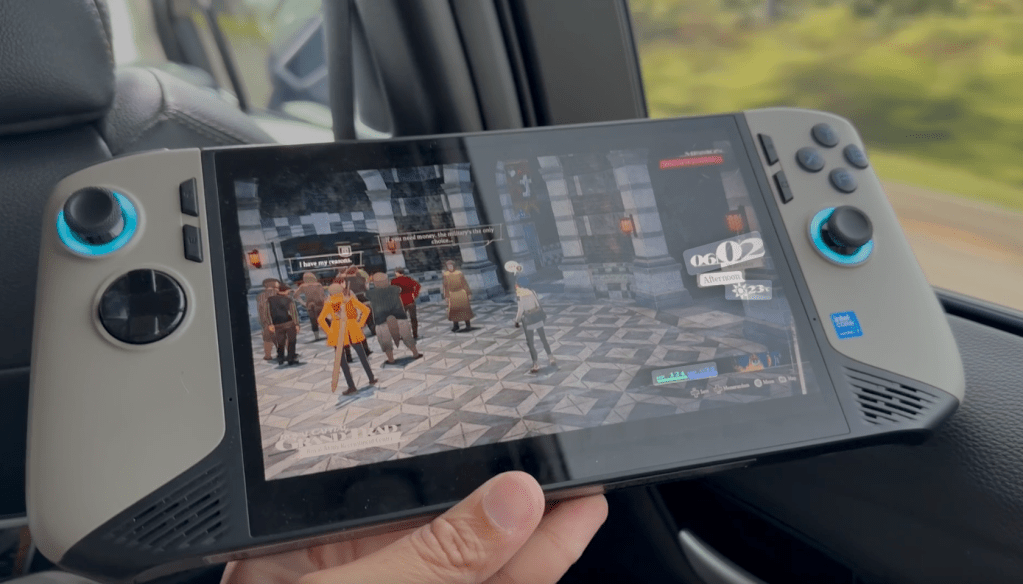
Portability-wise, I had no trouble lugging the big fella around throughout my travels. At the end of the day, a handheld is a handheld, and as such, requires a case. Once in a case, I don’t really feel the difference between carrying the Claw 8 or something like the Logitech G Cloud, which is much lighter. Because it’s still a device with a case that I have to carry separately. The G Cloud is a little easier to fit into a backpack given its smaller footprint—but again, in a case, the difference is negligible.
Software Updates
Over the past few weeks, Intel and MSI have been great in providing software and driver updates to make the gaming experience smoother and faster. If you’ve watched my previous videos, you’ll know how much I abhor MSI’s software on the Claw 8. They’ve updated MSI centre a couple of times now since the making of my videos, and I’m reservedly happy to report that the software experience on the Claw 8 AI+ is better…but still far from great.
My biggest issue previously was how terribly finicky the “Quick Settings” button was, bringing up the menu overlay with either a ridiculous delay or simply not at all. And once it did pop up, it was incredibly sluggish or outright unresponsive. The same went for MSI Centre and its corresponding button. Now, when playing a game in “borderless window,” pressing down on either the “MSI Centre” or “Quick Settings” buttons does bring up the respective menus more reliably, with each being much snappier than before. However, when playing a game in “Fullscreen,” something that you may be forced to often like in the case with Quantum Break, the buttons are, once again, completely unusable.
One thing that I will say I’ve enjoyed quite a bit on the software side of things with the Claw 8 is the “hibernate” function. Anyone who’s used a PC handheld will know how frustrating the “sleep” function on Windows is. From games crashing to the screen being unresponsive to Windows siphoning away battery life like Dr. Gero—it’s a mess. It’s why the PC handheld community often suggests new owners change their Windows settings to have their handheld “hibernate” when pressing the power button instead of “sleep.” However, a lot of ROG Ally and Legion GO owners have said that doing so still causes a lot of issues and they’re unable to get a smooth experience. Thankfully, I’ve had zero issues thus far with the “hibernate” function. I’m able to pause a game, press the button to have the Claw 8 go into hibernation, then pick it back up hours (sometimes days) later and be right back where I left it.
Though it’s frustrating that even after all these months, MSI hasn’t fully figured out their software experience in regards to MSI Centre, I commend them for continuing to push out updates and supporting this device. Once set up to my liking with the “hibernate” function properly in tow, the Claw 8 AI+ has honestly provided a pretty seamless and (almost) console-like experience for me. It was a great companion for my month-long trip, and I look forward to taking it with me whenever I make my way to wherever else life takes me on this spinning rock.
 Pixel Swish
Leave a comment