
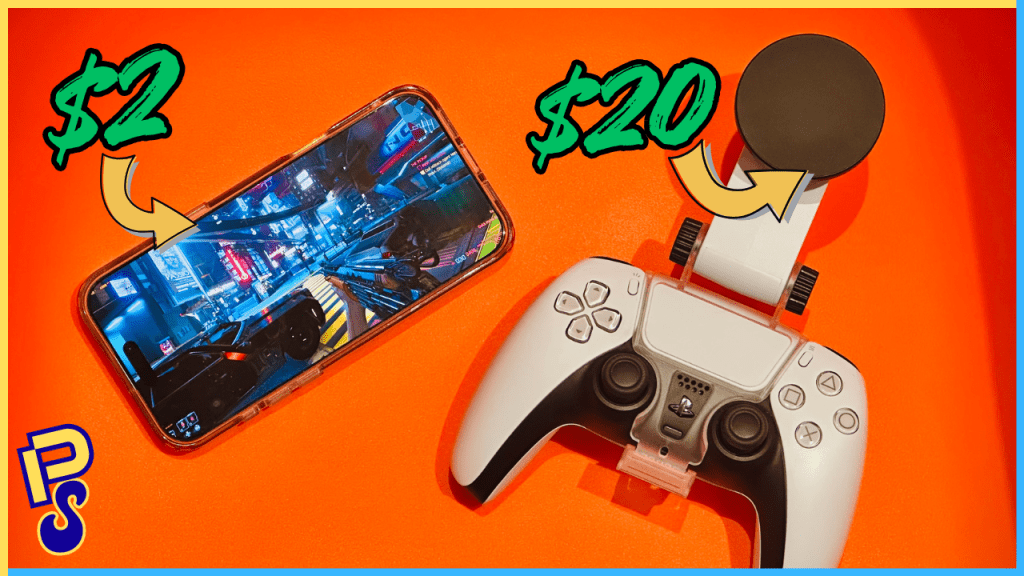
If you’ve ever tried cloud gaming on an iPhone, you’ll know that it kinda sucks. From cloud gaming services like GeForce NOW not having a native app due to Apple’s restrictions, making for poor visuals due to low resolution options, to camera bumps getting bigger with each generation, making your $100 controller accessory now obsolete, it always feels like you’re having to make concessions on an experience that the folks over on Android have had figured out for a while now (not the camera bump thing, but at least the native app thing).
For all the push these big tech companies are making for cloud-based services, the execution on Apple’s hardware has been oddly poor. Much of this, of course, is on Apple’s end, driven by their stubbornness and greed. Yet, as someone who’s been on the cloud gaming train ever since its inception, and as someone who has (unfortunately) committed their ecosystem to Apple over the past half a decade, I was patiently waiting for Tim Apple and his crew to figure things out, especially considering the strides cloud gaming has taken in recent years—that, of course, has yet to be the case.
Furthermore, for as great as the controllers like the Backbone and Razer Kishi are, they’ve never provided me with the seamlessness and casual “pick-up-and-play” experience I would want when playing games on my phone. For someone like myself who enjoys larger phones like the iPhone 16 Pro Max, and who’s not a crazy person and uses a case with said large phone (*ahem* MKBHD), these controllers are often clunky to use, and may not even support future phones because phone manufacturers seem to have a fetish for larger and larger camera bumps. Not to mention, most of these telescopic controllers, like the Backbone, don’t fold up in a way that makes them uber-portable, which makes me question why I wouldn’t just take something like my G Cloud when wanting to do some cloud gaming while in a hotel room on the road?
But I get it; there’s an allure to having your phone be your “everything machine.” Also, the iPhone 16 Pro Max has a gorgeous near-7” OLED. If I were able to get the same visual experience, combined with a similar “pick-up-and-play” experience to something akin to my Logitech G Cloud, I would prefer to. Two things, however, have always kept it away from doing so: 1. a controller system that was easy to pick up and snap on, without having to worry about taking off my case or if it’ll be compatible with future camera bumps, and 2. a way to get access to the full features of cloud gaming services like GeForce NOW.
Well, friends, as you’ll have already surmised from the title of this article, both of those solutions have come to fruition.
The App
As mentioned, none of the major cloud gaming platforms like GeForce NOW, Amazon Luna, or Xbox Cloud Gaming (side note: Dear Xbox, please can we just officially call it “Xcloud”?) have their own native app on iPhone. Much of this is due to Apple’s refusal to play nice with most streaming companies, requiring them to pay a 30% commission on every in-app purchase, including subscriptions (a policy that could be changing soon after a 2025 court ruling).
Furthermore, Apple needs to conduct an internal review of each game available in each application, which, when considering how often games get onboarded and taken off these services, obviously makes for a tedious process. But that’s Apple, and they love their precious walled garden. These reasons are precisely why you can no longer subscribe to Netflix through the app and instead need to do so via Safari. Speaking of which, Safari (or most other browsers on the iPhone) is how you need to access your cloud gaming service of choice.
The problem with most (if not all) browsers on iPhone is that they use WebKit, the engine that powers browsers like Safari and Chrome on iOS and iPadOS. Now, I’m not going to pretend to know the technology behind WebKit; all I know is that because of how it’s built, you’re unable to get resolutions higher than 1080p; no higher than 720p, in some cases, like with GeForce NOW. 720p in 2025 is absurd. And even though GFN now supports higher bitrates up to 75 Mbps, 720p is still a good bit lower than the 1440p we get on the Android side of things.
Enter CloudGear, a browser developed by Hong Kong-based developer Bitwise Solutions, custom-built for cloud gaming. On the App Store, the devs tout “Uncompromised Performance…Stream up to 5K video on supported platforms…Support for up to 120fps…HDR & 10-Bit Colour Depth…Controller Vibration…Immersive Fullscreen Mode.” All of the right keywords to get someone like me very excited, but also tread with caution because, well, I’ve been burned before.
Upon opening the app, you’re given the rigmarole on the browser’s features, then are met with the page all modern consumers fear: A paywall. $1.99 for a monthly subscription or $40 to buy the app outright. Now, being a frugal person, I cringe when having to pay for anything. Spending two bucks a month on a browser, of all things, would have the spirits of my South Asian ancestors come to beat me with a jharoo. But the devs do offer a one-week trial of the app, so I figured, fine, I might as well. It’s been six days into my trial, and safe to say, yeah, I’m spending that two dollars—sorry, ancestors.
Playing Cyberpunk 2077 via GFN at max settings with path tracing, at 1440p, on a 75 Mbps bitrate, utilizing the entirety of that gorgeous 6.9-inch XDR OLED on the 16 Pro Max, is a phenomenal experience. An experience that I had been pining for on iOS, and now it’s finally here, thanks to CloudGear. I have no idea how Bitwise were able to circumvent Apple’s WebKit constraints, but I’m now able to access all of the options and features that I would normally find on GFN’s native Android app, from higher resolutions to higher bitrates to advanced codecs.
Beyond that, a double-tap on the screen gives you access to the navigation bar, which, in addition to allowing you to enter your cloud gaming service of choice, also gives you access to some of CloudGear’s built-in features, like changing the aspect ratio so that you can force-stretch the game to fill the entire screen. However, these features don’t seem to work across all services. I tried adjusting the aspect ratio on Amazon Luna, for instance, to no avail. There are also some stability issues. More than once has the app crashed on me upon startup or when tapping back to it after it had been idling in the background for some time. Still, it’s been a great experience thus far, and hopefully the devs can push out updates to address these minor quirks.
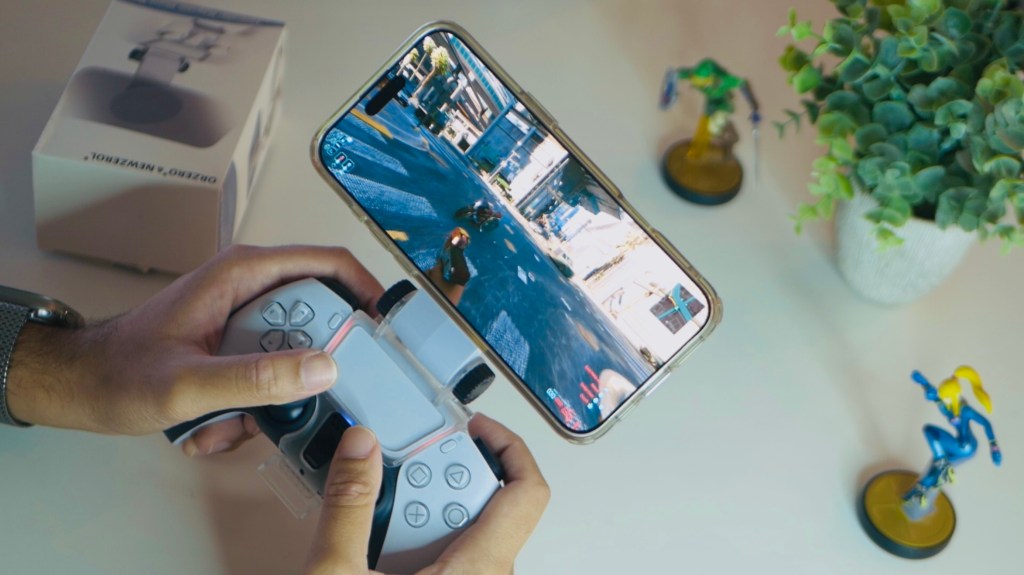
As it stands, for the most part, CloudGear has brought full feature-parity across all of the major cloud gaming services, and has made cloud gaming on iPhone actually more than just passable. From visual fidelity to latency to audio to controller rumble, CloudGear is a tremendous step forward for cloud gaming on iPhone. Speaking of controllers:
The Controller
So, when it comes to controller options for smartphones, you really only have two options. Either you buy one of those gizmos that clips onto your Xbox or PlayStation controllers, with a resizable clamp that holds onto your phone. Or, the more popular option, a telescopic controller like the Razer Kishi or Backbone. Personally, I don’t like either of these options, mainly for two reasons: usability and portability.
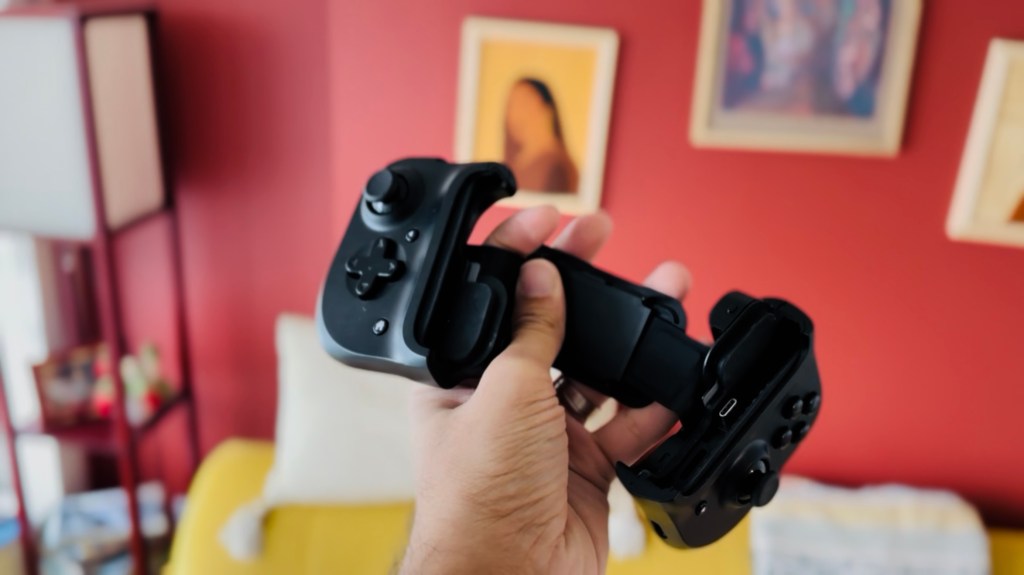
Nowadays, although you have telescopic controllers that fit larger phones and even small tablets like the Razer Kishi Ultra, they’re still a clamp-based design that may or may not work with cases and phones with larger camera bumps. This, in turn, makes for a fidgety experience that has you wrestling with the clamp to ensure a secure fit. This wrestling also happens with the controller clip, as many of them are made cheaply by third-party manufacturers, and more than once have I felt as though I was going to break the clamp because I was stretching it too hard. Basically, f*ck clamps.
Furthermore, when it comes to something like the Backbone, it isn’t exactly the most portable device. Sure, it’ll fit inside any ol’ backpack, but the amount of space it takes up isn’t all that different from something like my Logitech G Cloud. Well, it’s now where I introduce you to the $20 controller clip from Amazon that (mostly) addresses both of these issues.
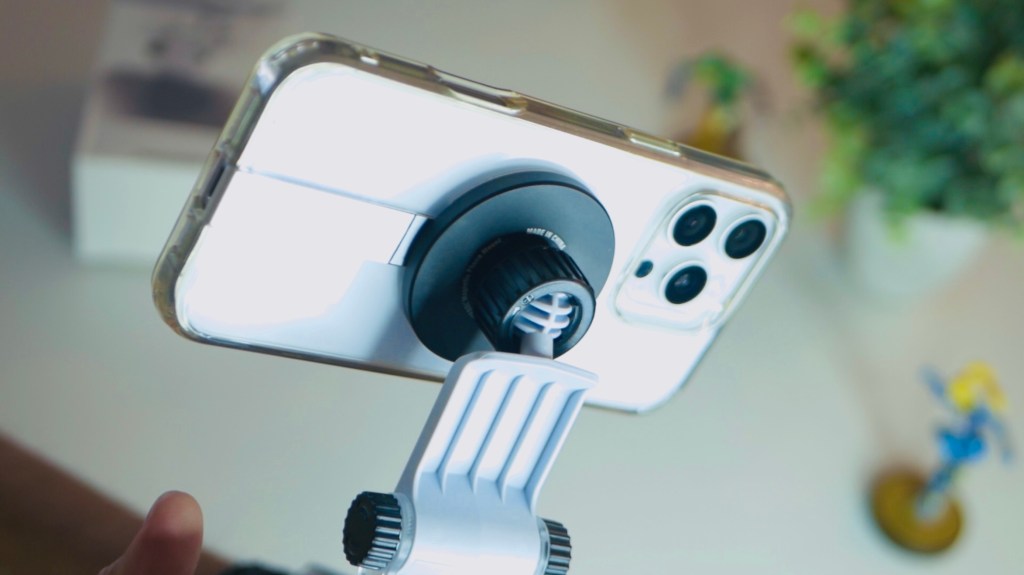
Made by tech accessory manufacturer Orzero & Newzerol, this clip attaches to the PS5’s DualSense like any other controller clip. What makes it different than others, however, is that it uses MagSafe instead of a cheap clamp. This, friends, is what makes all the difference. Now, as long as I’m using a MagSafe-compatible case, I can simply plop in my iPhone, and I’m ready to go. No wrestling with clamps, no concerns about whether my camera bump or case is going to make for a bad fit—it just works.
It’s also surprisingly sturdy. On the Amazon page, they advertise that this can support bigger tablets like the iPad Pro. And though I’m sure that experience may be a tad top-heavy, I can see it because of how secure the magnets feel. Speaking of magnets, don’t worry, Android users, you get a couple of magnet stickers, which you can attach to the back of your phone, and the clip will work just the same.
This setup has honestly been quite the game-changer for me. And in terms of portability, once detached, the clip barely takes up any space, and a cheap controller case makes for a nice, on-the-go setup that, frankly, isn’t all that different from carrying around a telescopic controller; not to mention you get the added benefit of having a full-sized controller on the go. Though I still don’t think playing triple-A games on the iPhone’s relatively smaller screen is ideal, I’m so glad I finally have a setup that at least gives me the option to do so.
 Pixel Swish
Leave a comment